Global Accessibility Awareness Day
Welcome to Global Accessibility Awareness Day, 2026 and thank you for joining us in celebrating all the ways faculty and staff are creating a more accessible and inclusive campus!
By ensuring course materials, syllabi, documents, images, websites and physical spaces are accessible, we’re breaking down barriers to learning for all students.
2026 Highlight: Faculty Champions in Accessibility!
This year, the Faculty Champions in Accessibility have created discipline specific accessibility guidance and they've participated in lively and engaging panel disucssions exploring simple changes faculty can make to create more equitable learning environments.
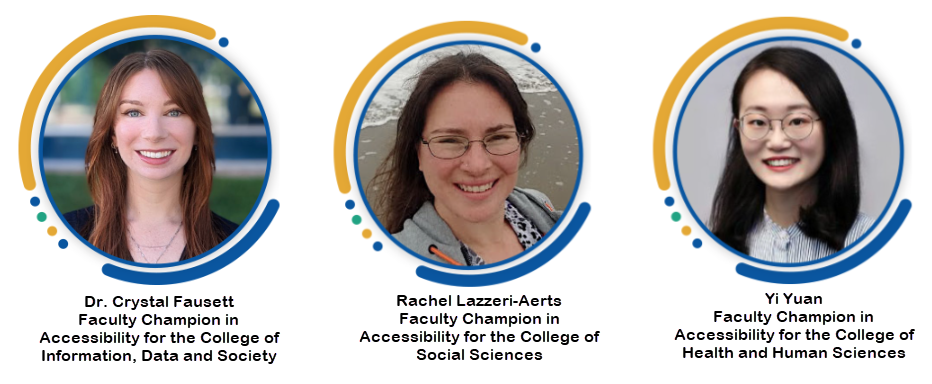
This Faculty Fixes: Accessibility in Action Podcast episode (5 min) features Faculty Champions in Accessibility:
- Crystal Fausett (College of Information, Data, and Society)
- Rachel Lazzeri-Aerts (College of Social Sciences)
- Yi Yuan (College of Health and Human Sciences)
(Note: This podcast was created using the original audio recordings of the panel discussion, Notebook LM and Adobe Podcast).
To Learn More
- Check out the official Global Accessibility Awareness Day webpage for details about this world-wide event!
- Schedule a consultation with a Center for Faculty Excellence and Teaching Innovation (CFETI) Instructional Designer to explore course design and accessibility best practices.
- Explore the SJSU faculty and staff videos and resources below for further exploration!
Even small changes can make a big difference in our students’ learning experiences.
SJSU Faculty and Staff Videos
Accessibility in the Dr. Martin Luther King, Jr. Library
SJSU King Library Accessibility (2 min video)
In celebration of Global Accessibility Awareness Day, learn about the Dr. Martin Luther King, Jr. Library's many accessibility features that help create an inclusive and welcoming space for all. From accessible entrances and elevators, sensory-friendly study areas, and online accessibility, King Library is committed to ensuring equitable access for every visitor. Learn how we’re working to support the diverse needs of SJSU and local communities! Whether you’re new to accessibility or already an advocate, watch for quick inspiration to move your accessibility awareness to the next level! King Library is for everyone!
Accessibility Power Up - Getting Started with Alternative Text
Accessibility Power Up - Getting Started with Alternative Text (4:45 min video)
Adding alternative text (ALT Text) is the quickest and easiest way to begin creating accessible content! In this video, Kara Stanley, SJSU Online Instructional Designer, provides a succinct explanation of the importance of ALT text in our increasingly visual world. Kara also gives multiple useful examples of how to write clear and concise ALT text and long descriptions for more complex images.
Taking Flight with Grackle towards Accessibility
Taking Flight with Grackle towards Accessibility (4:38 min video)
Are you using slides in your classes? Do you wonder if they’re accessible to all? In this video, Holly Quinones, Manager of Organizational Development and Enrichment Programs with University Personnel explains how she uses GrackleDocs and GrackleSlides to ensure her training materials and resources are accessible. It is essential that we create accessible content from the start because we really never know what accommodations students, faculty and staff might need.
The Introducing GrackleDocs (5:26 min video) provides an overview of how to install the GrackleDocs Add-on and how to check and remediate the accessibility of your Google Docs, Slides and Sheets. Note: You will need to install the add-on for each tool separately following the same instructions as described in the video. The SJSU GrackleDocs Webpage offers additional details.
GrackleDocs: Accessibility & Google Docs
GrackleDocs: Accessibility & Google Docs (1:48 min video)
Sarah Schraeder Cisneros, Associate Director of Academic Scheduling and Space Management,
explains how she uses GrackleDocs to seamlessly get feedback and tips to improve the
accessibility of everyday and broadly shared GoogleDocs. She strongly believes access
to easy-to-use tools, like Grackle, are the key to reducing and overcoming digital
barriers for our campus community.
Website Accessibility
Website Accessibility (8:03 min video)
Are you adding content to SJSU websites? Have you checked your content for accessibility? In this video, Klaus Trilck, Instructional Designer at Center for Faculty Excellence and Teaching Innovation, explains how to create accessible web content at SJSU and demonstrates Siteimprove which is an easy and useful tool to check web accessibility at SJSU.
Additional Related Resources:
SJSU Web Content Standards
Web Content Accessibility Guidelines (WCAG)
LinkedIn Learning: Accessibility for Web Design SJSU login required.
LinkedIn Learning: Accessibility-First Design SJSU login required.
SJSU Official Syllabus
SJSU Official Syllabus Overview (2:18 min video)
The SJSU Official Syllabus is a standardized syllabus template so students can easily find the content they need and it is fully accessible to students using screen readers. In this video, Anthony Bolanos, SJSU Online Instructional Designer, demonstrates just how easy it is to get started!
Additional Related Resources:
SJSU Official Syllabus Webpage
Accessibility at SJSU Library
Essential Library Resources:
Accessibility services at the library
Adaptive equipment at the library
Partner library San José Public Library accessibility services
SJSU Subject Librarian
Additional Accessibility Resources
Essential Campus Resources
Accessibility at SJSU is a comprehensive, easy to use webpage for students, faculty and staff. It outlines how to get accommodations, how to assist students who have requested accommodations, how to be an ally for those on our campus with disabilities and additional tips on how to create accessible learning environments.
Accessible Education Center (AEC) supports our students with disabilities by providing services and tools to bolster
their academic success.
Accessible Media
For videos to be accessible to all, they must include corrected captions. The SJSU Panopto webpage has videos and tutorials.
LinkedIn Learning: Creating Accessible and Inclusive Video SJSU login required.
Self-Directed Training Opportunities
Audit Your Syllabus Course - Public Version
Accessible Canvas Courses You can use the content as a resource or complete all four assessments for a certificate.
Disability Sensitivity Training (source GAAD website)
LinkedIn Learning: Inclusive Learning Design SJSU login required.
A to Z: A Complete list of Accessibility Resources
General Accessibility Resources
Accessibility at SJSU
Accessible Education Center (AEC)
Audit Your Syllabus Course - Public Version
Global Accessibility Awareness Day
Equidox
GrackleDocs
SJSU Panopto webpage
PDF Accessibility
Siteimprove Account Request
SJSU Official Syllabus
SJSU Web Content Guidelines
TidyUp
UDOIT
Library Accessibility Resources
Accessibility services at the library
Adaptive equipment at the library
San José Public Library accessibility services
Web Accessibility Libguide
Local accessibility training resources
Collections in alternative formats
Library Liaison: Find Your Subject Librarian
LinkedIn Learning Courses on Accessibility (SJSU Login Required)
Accessibility for Web Design
Accessibility-First Design
Inclusive Learning Design
Creating Accessible PDFs
Creating Accessible and Inclusive Video